

Zorn is rebranding to Nekoma
2026-01-17T14:10
Every project eventually outgrows it's first name, including the long lasting project Zorn, that time has finally arrived. It was really a matter of when, not if, Zorn would get a new name. From the start when Zorn started as a built-in integration for the MinPluto frontend project, that the name "Zorn" would served strictly as a placeholder; while a working title was meant to carry out the development as the project's true identity could be established.
Now, that transition is finally coming officially years later as the project now moves forward under the new name of "Nekoma". While the name Zorn served well during the early development phase, the shift to Nekoma signals that this project has reached a level of maturity and focus it was always intended to have. In this post, we'll look at the past of Zorn's old interface and codebase, along with other revisions that never happen or took off, as we head further into 2026 with a new future for the project.
Original Purpose
As it's been noted before in previous documentation and other product pages on the web, Zorn was originally designed as the native and built-in video player for MinPluto, a YouTube frontend project. However, YouTube's war and aggressive stance against adblockers made maintaining a YouTube frontend increasingly difficult, as their war on adblockers heaviy affected them as well, putting it in the cross-fire. As a result, MinPluto as a frontend project was scrapped and converted as a media-focused subsidiary of SudoVanilla.
Since this shift, Zorn was ripped from its' original project and rebuilt as a standalone, dedicated video player. It is now built as an integration for Astro powered websites.
Through the Years
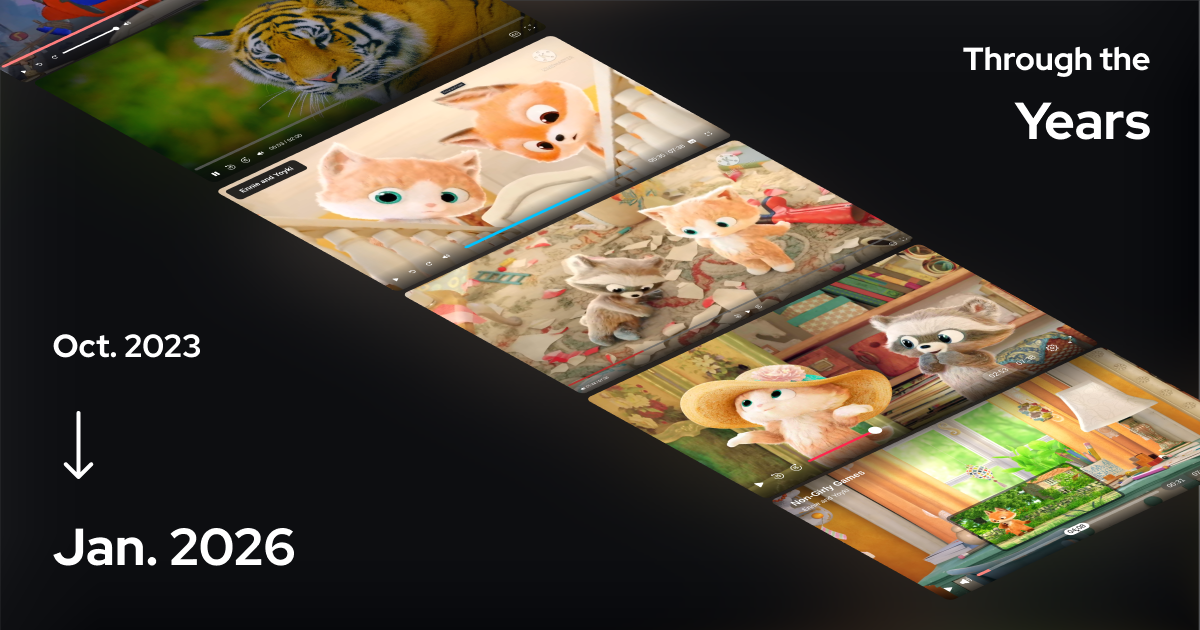
Since the development of Zorn(originaly Plyx Player) began on October 16th, 2023, the video player's user interface and layout have undergone a complete transformation quite a few times as I improved my skills in web development. What started as a basic framework built on vanilla JavaScript, has evolved into a more intuitive, polished experience through several iternative overhauls. Originally developed in vanilla JavaScript, Zorn transitioned to Astro one month after it's inception to leverage a component-based architecture. This shift was designed to simplify the interface assembly and streamline the overall development process.
Over the past two years and a half, Zorn has evolved into a more mature and compatible tool through several improvements and added features:
- Expanded controls to add a wider array of buttons and custom keyboard shortcuts for faster video navigation.
- Visual navigation and improved integrated seekbar and storyboards for better visual context during playback.
- Enhanced user interface to introduce re-usable popups and menus, refined design elements, and to improve overall usability and cross-platform compatibility.
- Enhanced the developer experience by integrating typesafe interfaces. This addition allows for the indicating errors ahead of time and provide robust autocompletion support for Astro developers, streamlining the coding process and improving code quality.
Embeds Are Here
As of January 14th, 2026, a new embed generator became avaialable in beta, allowing you to integrate Zorn into non-Astro websites. This tool provides the nessesary URL and iFrame code, while also offering an optional snippet specifically for Astro developers.
Using an iFrame simplies the integration process, ensuring seamless framework compatibility for developers who are not using the Astro Web Framework. Meaning that Zorn can now be embedded on on websites powered by other frameworks like Wordpress, Hugo, Jekyll, Bridgetown, NextJS, Vue, and more; along with embedding Zorn into website builders like Wix, Weebly, Squarespace, Webflow, Shopify, Framer, Frappe Builder, Nitro Pages, and so much more.
You can create one now using Nekoma Embed Generator.
What's Next for the Future
Future plans for Nekoma include improve support for embeds, internationalization (i18n), and touch gestures like swiping and tap to hold. To assist end-users in certain scenarios, user-friendly documentation will be created for Nekoma, direct links to documentation will be integrated into the video player for error handling; a "How to enable JavaScript" subdomain already exist for those without JavaScript enabled.
For progress tracking, you can view the public kanban board.
Other updates
With the release of v0.8.0:
- Added chapters
- Added buffer bar
- Improved error screens
- Improved style for big play button
- Fixed storyboard thumbnail positioning
- Fixed volume mute toggle
- Increased delay of when the controls disappear when cursor is idle (2.4s to 3.9s)
- Minor adjustments to touch gesture area
Try Nekoma and Integrate
- Demo: https://nekoma.demo.sudovanilla.org
- Embed: https://nekoma.embed.sudovanilla.org
- Documentation: https://nekoma.docs.sudovanilla.org
- JS Package: https://registry.sudovanilla.org/js/@minpluto/nekoma
- Source Code: https://ark.sudovanilla.org/MinPluto/Nekoma